
Step-by-step guide
How to Install CS 1.6
Six windows, about three minutes, no account. Below is every screen the installer shows you, in order, with what it means and what to click. Windows throws two warnings at the start; both are normal for a game like this, and we explain why.
- Time about 3 minutes
- Disk 694.5 MB free
- Windows 11 / 10 / 8 / 7
- Clicks 6
Before you start
Download Counter-Strike-1.6-Warzone.exe (278 MB) from this site. Copies on other sites can be modified.
Compare the file's SHA-256 with the checksum on the download page. If it matches, the file is exactly the one we published.
The game needs 694.5 MB on the drive you install to. Any Windows PC from the last fifteen years is fast enough; see the system requirements.
The installer, screen by screen
-
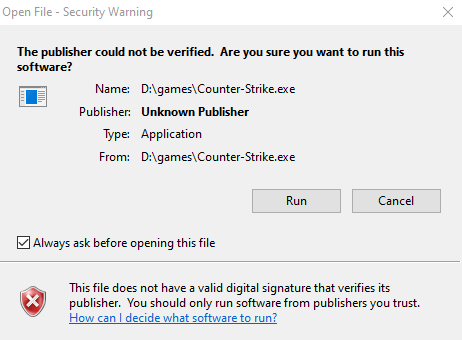
Step 1 of 6
Windows asks if you want to run the file
This Open File - Security Warning appears for any program you downloaded from the internet that does not carry a paid digital signature. That is all "Unknown Publisher" means: nobody bought a code-signing certificate for a free community game. It says nothing about the file being harmful.
Click Run. Your file is called
Counter-Strike-1.6-Warzone.exe; the name in the picture is from an older copy. If you see a blue Windows protected your PC box instead, that is SmartScreen: click More info, then Run anyway. -
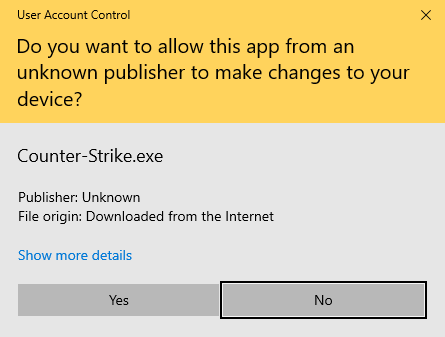
Step 2 of 6
Allow the installer to make changes
The installer creates the game folder and the shortcuts, so Windows asks for administrator permission through User Account Control. "File origin: Downloaded from the Internet" is expected; it is the same tag that triggered step 1.
Click Yes. On a standard (non-admin) Windows account, this window asks for an administrator's password instead.
-
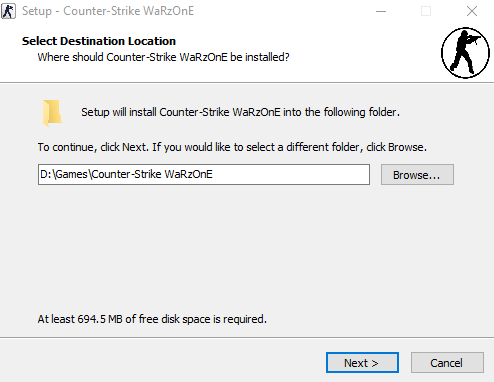
Step 3 of 6
Pick where the game goes
Setup suggests a
Games\Counter-Strike WaRzOnEfolder. Keep it, or click Browse to install on another drive. You need 694.5 MB free there.Avoid
C:\Program Files. Windows protects that folder, and an older game like CS 1.6 cannot write its config there: your name, binds and video settings would reset or end up in a hidden copy. A folder such asC:\Gameshas no such problem. Click Next. -
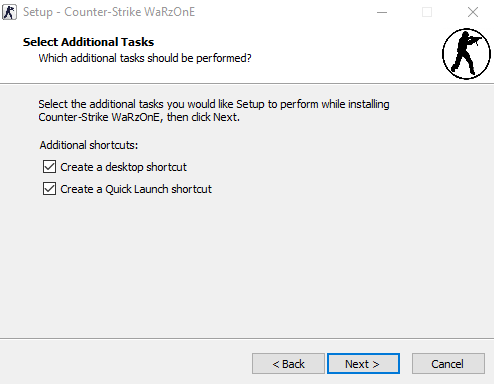
Step 4 of 6
Keep the desktop shortcut
The desktop shortcut is the one to keep: it starts the game through its launcher with the right options, including
-noforcemparms -noforcemaccel, so Windows mouse acceleration does not interfere with your aim.Quick Launch is a taskbar toolbar from the Windows XP and Vista days. On Windows 10 and 11 it stays hidden, so leaving it ticked does no harm. Click Next.
-
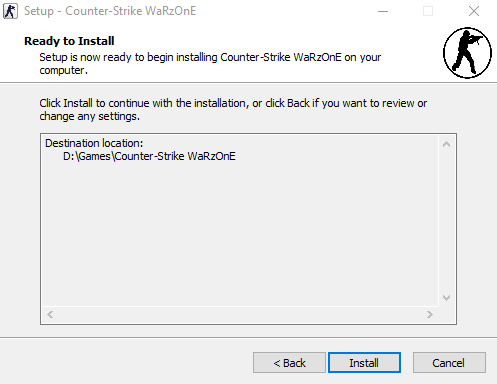
Step 5 of 6
Check the summary and install
One last look at the folder you chose. If it is wrong, Back takes you to the previous screens without losing anything.
Click Install. Setup unpacks about 6,700 files: the game, bots, the dedicated server and HLTV. On an SSD that takes well under a minute; an old hard drive needs a little longer.
-
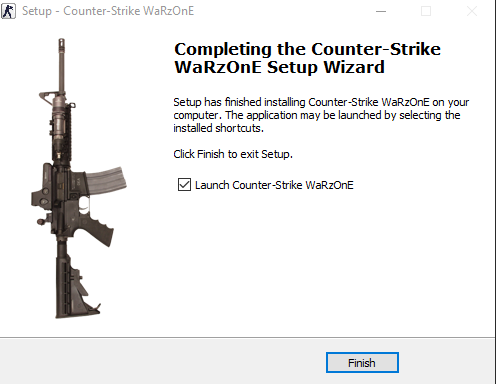
Step 6 of 6
Finish and start playing
Done. Leave Launch Counter-Strike WaRzOnE ticked and click Finish: the game starts right away. From now on, start it with the desktop shortcut.
On the first start, set your nickname and screen resolution under Options, then pick a server from our CS 1.6 server list or start a New Game with bots.
Your first five minutes in the game
- NameOptions › Multiplayer: type the nickname other players will see.
- ResolutionOptions › Video: choose your monitor's resolution. If the picture is cut off, pick a smaller one.
- ConsoleOptions › Keyboard › Advanced: tick Enable developer console, then open it with ~.
- PlayJoin a server with
connect IP:port, or New Game for an offline match with bots.
Problems after installing
My antivirus blocked or deleted a game file
Non-Steam editions of CS 1.6 ship with a small Steam emulator so the game can run without a Steam account, and some antivirus programs flag that kind of file by pattern rather than by what it does. First compare the installer's SHA-256 with the published checksum. Only if it matches, restore the file from quarantine and add the game folder to your antivirus exclusions.
Black screen, or only part of the picture is visible
Usually the resolution does not suit your monitor, or Windows display scaling (125% or 150%) stretches the old game. Try these in order:
- In Options › Video, choose a lower resolution, then go back up step by step.
- Right-click the desktop shortcut, Properties › Compatibility › Change high DPI settings, tick Override high DPI scaling behavior and set it to Application.
- Add your resolution to the end of the shortcut's Target, for example
-w 1920 -h 1080. - Update the graphics driver from Intel, AMD or NVIDIA. CS 1.6 draws with OpenGL, which the basic Windows driver handles poorly.
My settings reset every time I start the game
The game is almost certainly installed under C:\Program Files, where Windows blocks it from saving its config. Uninstall it and install again into a folder like C:\Games\Counter-Strike WaRzOnE (step 3 above).
Windows says the app can't run on this PC
The download was probably cut off. Delete it, download the installer again and check its SHA-256 before running it.
How do I uninstall it?
Windows Settings › Apps, find Counter-Strike WaRzOnE and click Uninstall. Uninstalling removes the game files, so copy your config.cfg from the cstrike folder first if you want to keep your binds.